
UTM tracking links on your own domain.Change the campaign, keep the link.
Branded links and dynamic QR codes on your own domain, for ads, email, print and social. Your UTM tags reach your analytics, the destination can change after launch, and nobody files a ticket.
14-day free trial on Pro. Core starts right away.

Try the live demo, no sign-up →
Trusted by teams that run their own domains
- Global PoPs
- 130
- median first byte. Bitly: 116ms*
- 16ms
- platform uptime
- 99.99%
* From our public redirect speed test: median time to first byte over the last 7 days, averaged over Washington, D.C., Frankfurt and Tokyo. See the provider rankings · Uptime status page
Your domain
Your links, on your domain
go.yourbrand.com/spring instead of a vendor's short domain. Each link resolves through a hostname you own, with HTTPS issued and renewed automatically. Your links don't share a domain with anyone else's, so another customer's spam can't drag down a domain your campaigns depend on.
What we don't promise: ad platforms review your ads and landing pages, not just the link. A branded domain removes the shared-shortener risk. It doesn't guarantee approval.
The link in your ad
shared.short/x7Kp2
go.yourbrand.com/spring
Hostnameyours, not shared
HTTPSissued and renewed automatically
Attribution
UTM tags that make it to your analytics
Set the UTM tags on the link once, instead of pasting them by hand into every ad and email. Query parameter forwarding passes on any parameters already in the URL, so nothing is stripped on the way.
Tag links by campaign or channel, then filter the Links page and analytics by tag.
go.yourbrand.com/spring
spring-saleemail- utm_source
- newsletter
- utm_medium
- utm_campaign
- spring
→ yourbrand.com/sale?utm_source=newsletter&utm_medium=email&utm_campaign=spring
Query parameter forwarding: on
After launch
Printed it already? Change where it goes.
A dynamic QR code prints a URL on your domain, and the destination behind it can change after the flyers, menus or packaging are out. Download codes as PNG (512, 1024 or 2048 px) or SVG.
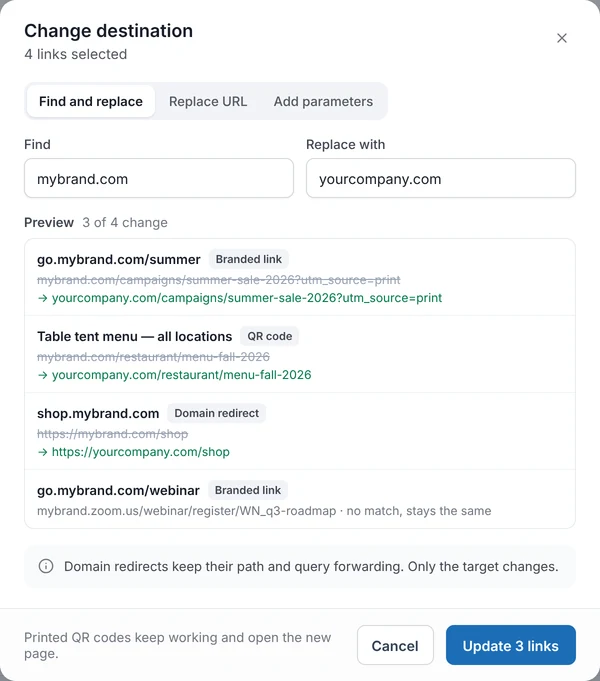
Moving a whole campaign at once? Select the links, change the destination in one step, and see a preview before it applies. On Pro, every link keeps its history: who changed it, when, the old and new value, and where the change came from.
Landing page tests
Split traffic between landing pagesPro
Give one link several destinations. Random routing splits visitors evenly between them; sequential routing sends them through the destinations in order. Pause or swap a page from the dashboard, with no deploy.
Good to know: splits are even. Custom percentages per destination aren't offered.
go.yourbrand.com/spring
RandomVisitors are split evenly between the destinations.
- Ayourbrand.com/sale/springActive
- Byourbrand.com/sale/spring-bActive
- Cyourbrand.com/sale/spring-cPaused
Analytics
See which channel works, without the bots
Clicks, unique visitors, QR scans and errors (clicks that hit a 4xx or 5xx), each compared with the previous period. Break them down by country and city, channel and referrer, device and browser, link and tag. Turn on Humans only to leave bot clicks out of every figure. A live counter shows the last 30 minutes.
History: 90 days on Core, 6 months on Pro.

“I like RedirHub because it's simple and straightforward with no fluff. The redirect tool is particularly useful, especially for mass URL redirection and capturing old traffic from an unused subdomain to our main site.”
- URL rules managed
- 10,000+
- visits redirected each month
- 150k+
- workspace for the whole team
- One
“it was very easy to setup and use and provides valuable reporting on how effective the redirects are.”
FAQ